Linux commands

A passionate DevOps & High Performance Computing enthusiast from India
Some Linux commands that might help you ..!!
ctrl + d - controls character signals the end of the input file
dmseg - command shows kernel log msg
stty - command is used to set terminal IO characteristic
script - command is used to record a user login session in a file
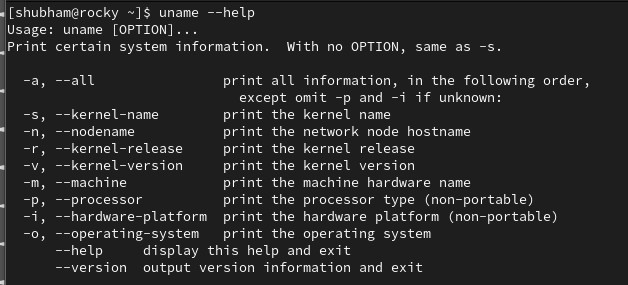
uname - command is used to display the system parameters
lpr - command is used to print a file
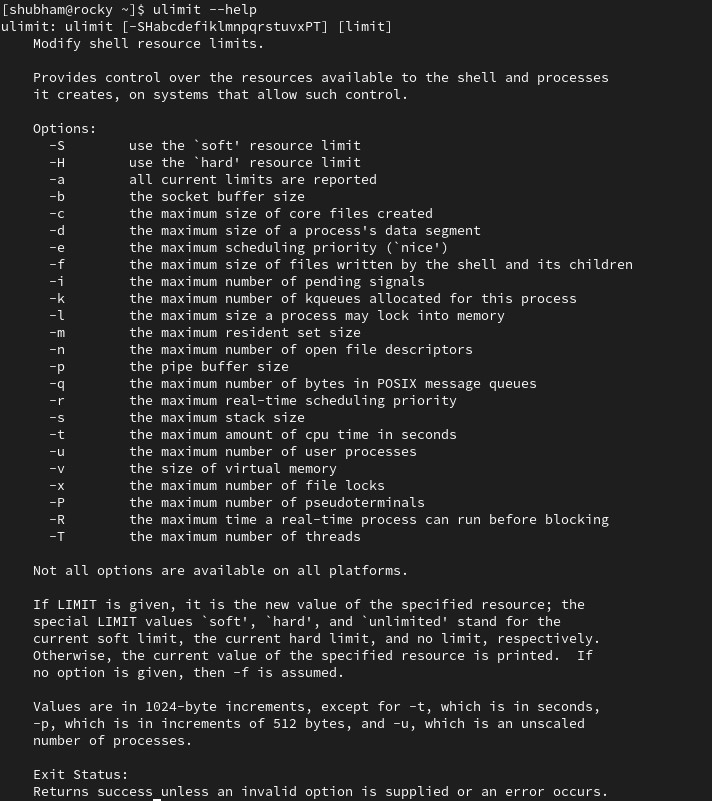
ulimit - command you find resource limits to the session
ls -i - command used to view file inode number
od - command is used to display the octal value of the text
zcat - command is used to view compressed text file contents
tee - command is used to extract intermediate results in a pipeline
cut - command is used to extract a column from a text file
du - command is used to display the disk consumption of a specific directory
cpio - command is used to perform backup in Unix
File - command is used to identify the file type
dd and rawrite - command is used to create a Linux installation boot floppy
/etc/hosts - file specifies the order in which to use specified name services
rpm -i - the command used to install rpm packages
mkfs - command do you use to create Linux file systems
ps - the command is used to display the characteristics of a process
R - command is used with vi editor to replace text from cursor to right
h - command is used with the vi editor to move the cursor to the left
#,- What sign is used to back up over typing errors in vi
3 dw - command is used with the vi editor to delete three words
@ - the sign is used to erase or kill an entire line you have typed and start you are on a new line
b - command is used with the vi editor to move back to the beginning of a word
/ - command is used with the vi editor to search a pattern in the forward direction
e - command is used with the vi editor to move forward to the end of a word
lpr - the command is used to add printing jobs to the queue
lpc - command is used to remove jobs from the print queue
named - server is used with the BIND package
smbclient - command is used to access an SMB share on a Linux system
rpcinfo - command is used to see the services running in NFS server
cpio - command is used to copy directory structures in and out
tee - command is used to save the standard output in a file, as well as display it on the terminal
umask - command specifies the permissions that the user does not want to be given out to the newly created file or directory
rpm -q - command is used to query for a specific package with RPM
/etc/profile - script is run for setting bash global defaults for all users
In /etc/ftpuser - file can you specify which users are not allowed to access a system via FTP
cron - program is used to schedule particular jobs or programs at particular times on the system
sync - command can force all buffers to disk
updatedb - command is used to be executed frequently to refresh locate database so that locate command can find new files created
82 - the partition's system ID type be,to create a swap partition by using fdisk, the partition's system ID type be
/etc/services - file contains the list of port numbers (and associated names) monitored by inetd
/sbin - location of some system configuration and system administrator executable files
/usr - location for subdirectories for local programs and executables for user and administrative commands
--recompile - you can rebuild the RPM file to include the new patches
/sbin/edquota - command is used to set user and group quotas
2GB - is the maximum size of a swap partition (with kernel version 2.2.x), To increase the amount of memory available for a system,
/etc/fstab - file is used to configure which filesystems are mounted
/dev - subdirectory(ies) contains the device files
/etc - subdirectory(ies) contains the system boot scripts
fsck - tool is used to check and repair Linux file systems
fdisk - tool is used to partition your hard drive
/var/log - can system and mail logs be found in Ret Hat Linux
cat - command is used to display and create files
head - command is used to display the top of the file
who am i - command can be used to get information about yourself
layer 7 protocol - layer protocol is responsible for user and the application program support such as passwords, resource sharing, file transfer and network management
SMB (Samba) Connectivity - package group will you select during the custom configuration to enable the machine to communicate with Windows clients
switchdesk - following tool allows you to change your default X Window desktop
lp - command is used to print a file
TFTP - TCP/IP protocol is used for file transfer with minimal capability and minimal overhead
SMTP - TCP/IP protocol is used for transferring electronic mail messages from one machine to another
GNOME is based on - COBRA toolkit
ipchains - can be used to set up a firewall on a Linux system
mkkickstart - program is used to automatically install Red Hat Linux on identical hardware
SSH - service is not monitored by inetd (internet service daemon)
? - shell's wild-card is used to match a single character
*- shell's wild-card is used to match all characters
route - command do you use to add routes to a Linux router
nfsmount ,knfsd , mount - commands are used to mount NFS filesystems
82 and 83 - are the appropriate Hex codes for setting Linux swap and Linux native partition types in fdisk
/etc/lilo.conf - you have to edit to boot your new kernel image after you have compiled your kernel
cmp - command is used to compare the files
du - command is used to summarize the disk usage
DOS - format of partition tables does Linux use
ypwhich - NIS clients return the name of the NIS server used by the NIS client
which - Command used to determine the path of an executable file
ls-aR - command is used to display all the files including hidden files in your current and its subdirectories
ftp - command can be used to copy files across systems
umask - command can be used to change default permissions for files and directories at the time of creation
tvf - command option is used to list the files in a tape archive format
date +%d/%m/%Y - command to display the current date in the form dd/mm/yyyy
cat sample.txt|more - command syntax to display the file ‘sample.txt’ one page at a time
tar -rvf file1 example.tar - to add (append) a file “file1” to the example.tar file
:!ls - to execute ls command inside a vi editor
cmp - command gives the first byte where the difference is in the file1 & file2
vi +num file1 - To open a file file1 with cursor at line number 4
talk - communication command provides communication to another user logged on by writing to the bottom of their terminal
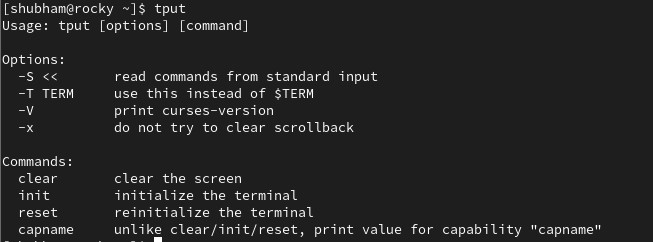
tput - screen manipulation command
netstat -r - command will you use to see the available routes


